

Strata manager finder for strata managers
Learn about the Strata manager finder. A free online directory for strata managers to promote their business and for strata schemes to search for strata managers in their local area.
Strata manager finder overview
Strata manager finder is an online directory of strata managing agents in NSW. It helps strata property owners, such as committee members, to find strata managers who service their local area.
To search the directory, enter an address to view:
- strata managers that manage schemes in the area
- the types of schemes the strata managing agent manages (for example, residential or mixed schemes)
- size of schemes the strata managing agent specialises in
- any compliance or disciplinary action on the strata managing agent’s licence.
Strata manager finder for strata managers
As a strata manager, you can use Strata manager finder to promote your business and provide prospective clients with information about what your business offers.
All strata managers who have reported a scheme in Strata Hub for strata annual reporting will appear in the search results.
You can opt out of Strata manager finder if you don’t want to participate.
All strata managing agents who have reported schemes in Strata Hub are listed in search results
Strata manager finder uses information from Strata Hub to list strata managers who have reported schemes in the search area.
For example, when a customer searches 1 Smith Street Sydney, 2000 they will see all strata manager business details who have reported schemes in Sydney 2000 and surrounding suburbs.
Unless you have opted out, your business details will show in the search results.
How to set up your business profile
You will need the following details:
- business address and contact details.
- a short description of your business including who you are, what services you provide, and any other information you want customers to know.
- office locations to help customers find strata managers that service their local area.
You will also need to select:
- whether the business is a Strata Community Australia (NSW) and/or Real Estate Institute NSW member.
- if clients have access to a customer portal.
- the types of schemes your business services (residential, commercial and/or mixed schemes and/or retirement villages) and size of those schemes.
- any specialist services you provide such as:
- strata renewal committees
- community associations in community land schemes
- building management committees
- company title.
Example of a customised profile in Strata manager finder
An example* showing how a business profile can be customised with key information and ‘More about us’ sections in Strata manager finder.

*Click on the image to make it larger.
Example of a blank profile in Strata manager finder
An example* of a blank profile showing how your business profile will appear if you don’t add any information to it.
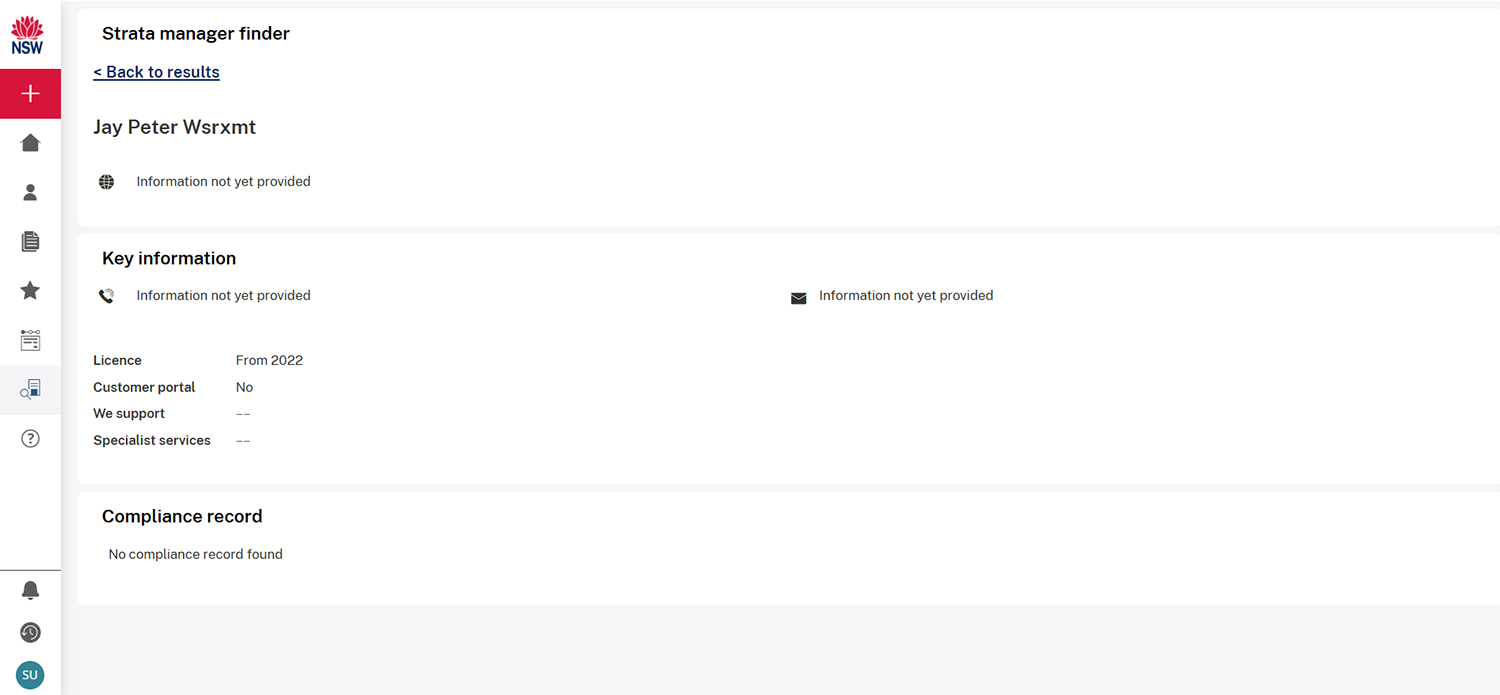
*Click on the image to make it larger.
How to enter business profile details
All strata managers who are reported against schemes in Strata Hub have been sent an email inviting them to:
- accept the role of business details manager or transfer it to someone else,
- enter and/or update business profile information,
- opt out from Strata manager finder (if needed). They can opt in again in the future.
You may receive multiple invitations if you report schemes for multiple strata manager licences using the same Strata Hub user account.
How to use the Strata manager finder to manage business details
If you have received an email from Strata Hub or your agency prompting you to accept the role of business details manager, follow the steps below to either accept this access or transfer it to someone else.
Once they have either accepted or transferred the access to another person, the business details manager will be assigned for your strata management agency.
If you are not sure who has been assigned with this access, please email stratasystem@customerservice.nsw.gov.au and include details of who your nominated business details manager should be, so we can update this.
Accept access
- Register on the Strata Hub, if you haven’t done so already.
- Log in to Strata Hub and go to ‘My profile’.
- Navigate to the ‘Strata managing agent business details’ section.
- Click the ‘Accept’ link for the business name or licence number you will be managing.
- Select ‘Myself’ and click ‘Submit’ in the pop-up window.
Transfer access
- Register on the Strata Hub, if you haven’t done so already.
- Log in to Strata Hub and go to ‘My profile’.
- Navigate to the ‘Strata managing agent business details’ section.
- Click the ‘Transfer’ link for the business name or licence number you wish to transfer.
- Provide the registered email address of the Strata Hub user you want to transfer to and click ‘Submit’ in the pop-up window.
- The new business details manager will receive an email with detailed steps on how to accept the transfer.
Update business details
If you are the business details manager for your agency, complete these steps:
- Log in to Strata Hub and go to ‘My profile’.
- Navigate to the ‘Strata managing agent business details’ section.
- Click the ’Update’ link for the business name or licence number you wish to update.
- Update the information in business details and select ‘Submit’ to save.
Note: If you’re a current member of the Strata Community Association, you should include the following text on your profile: ‘Liability limited by a scheme approved under Professional Standards Legislation’.
How to opt out
- Log in to Strata Hub.
- Go to ‘My profile’.
- Navigate to the ‘Strata managing agent business details’ section.
- On the business details screen, navigate to ‘Display in Strata manager finder’ and select ‘No’.
- Click ‘Submit’. Your business will no longer appear in the Strata manager finder – unless you decide to opt in again.
Note: individuals may be included in Strata manager finder results when the individual licence has been reported against a scheme. If you need to correct this, you will need to update the scheme with your company’s corporation licence (subject to the owners corporation’s approval).
Common questions about Strata manager finder
Why are my business and contact details not appearing?
Strata manager finder displays your business name based on the information you have provided as part of strata annual reporting on Strata Hub.
You can follow the instructions under ‘Update business details’ to update your business profile with more information.
Our trading name differs from our corporation licence name - can we change what appears on Strata manager finder?
Yes, you can update business details using the ‘Business name’ field in the business profile for your strata management agency to provide the business name you would like to display for the agency.